introduction
Have you ever wondered how people build beautiful websites and blogs without knowing how to code? The answer, more often than not, is WordPress.
Whether you want to start a personal blog, an online store, or a business website, WordPress makes it possible — even if you are a complete beginner. In fact, over 43% of all websites on the internet are powered by WordPress. That is a huge number, and for good reason.
In this guide, you will learn exactly what WordPress is, how it works, and why so many people around the world trust it to build their online presence. Let’s get started.
What Is WordPress?
WordPress is a free, open-source content management system (CMS) that allows you to create and manage websites without writing a single line of code. You can think of it as a powerful tool that sits between you and your website — handling all the technical stuff in the background while you focus on your content.
It was first launched in 2003 by Matt Mullenweg and Mike Little as a simple blogging platform. Over the years, it has grown into one of the most flexible and widely-used website builders in the world.
Two Versions of WordPress
There are actually two different versions of WordPress, and beginners often get confused between them:
1. WordPress.com This is a hosted platform. WordPress.com takes care of hosting for you. It is easier to set up, but you have limited control over your website. The free plan comes with WordPress-branded ads and fewer customization options.
2. WordPress.org This is the self-hosted version — and it is what most people mean when they say “WordPress.” You download the software for free from WordPress.org, install it on your own web hosting, and have full control over your website. This version is recommended for anyone who is serious about blogging or building a business online.
For the rest of this article, we will be talking about WordPress.org.
How Does WordPress Work?
Understanding how WordPress works is easier than you might think. Let’s break it down step by step.
Step 1: Web Hosting and Domain Name
Before you can use WordPress, you need two things:
- A domain name — This is your website address (for example, yoursite.com)
- Web hosting — This is where your website files are stored on the internet
Think of your domain name as your home address and your web hosting as the actual house. Popular hosting providers like Bluehost, SiteGround, and Hostinger make it easy to get started, and many of them offer one-click WordPress installation.
Step 2: Installing WordPress
Once you have hosting, you can install WordPress in just a few minutes. Most hosting companies offer an automatic installer so you do not need any technical skills. After installation, you will get access to the WordPress Dashboard — your central control panel.
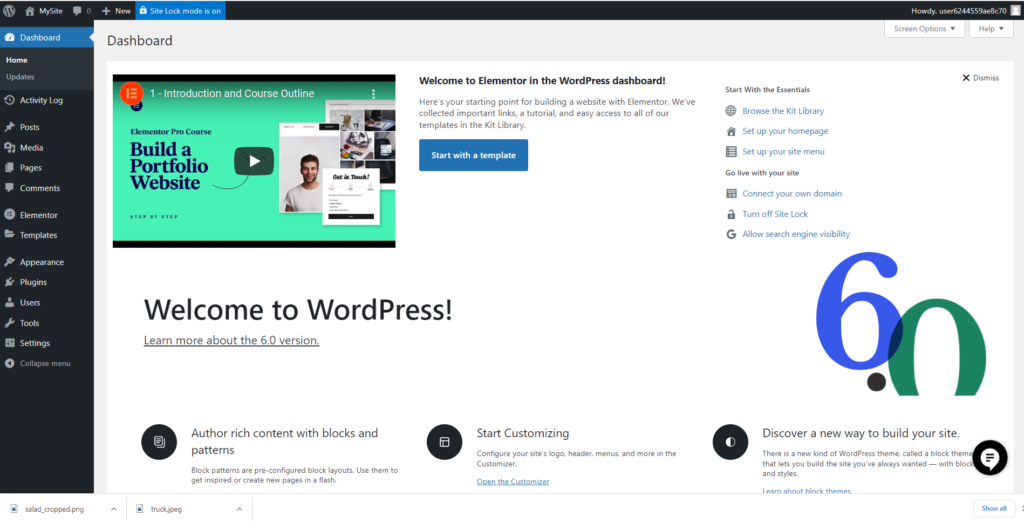
Step 3: The WordPress Dashboard
The WordPress Dashboard is where you manage everything on your website. From here, you can:
- Write and publish blog posts or pages
- Add images, videos, and media
- Install themes to change the look of your site
- Add plugins to add new features
- Manage comments and users
It is a clean, user-friendly interface that anyone can learn to use quickly.
Key Parts of WordPress Explained
To fully understand how WordPress works, let’s look at its core components.
Themes
A WordPress theme controls the appearance of your website — the colors, layout, fonts, and overall design. There are thousands of free and paid themes available in the WordPress Theme Directory.
Want your blog to look clean and minimal? There is a theme for that. Want a bold, colorful design for a food blog? There is one for that too. Switching themes does not affect your content — only the look changes.
Plugins
Plugins are like apps for your WordPress website. They add extra functionality that does not come built-in. For example:
- Yoast SEO — helps you optimize your content for search engines
- WooCommerce — turns your website into an online store
- Contact Form 7 — lets visitors send you messages
- Akismet — protects your site from spam comments
There are over 60,000 free plugins available in the WordPress Plugin Directory, covering almost every feature you could ever need.
Posts vs. Pages
WordPress organizes your content into two main types:
- Posts — These are time-based entries, perfect for blog articles and news updates. They appear in reverse chronological order (newest first).
- Pages — These are static content areas like your Home page, About page, or Contact page. They do not have dates and are not part of your blog feed.
The Block Editor (Gutenberg)
WordPress uses a modern drag-and-drop editor called Gutenberg. It works with “blocks” — individual sections for text, images, videos, buttons, and more. You simply click, type, and arrange blocks to build your content visually. No coding required.
Why Should You Use WordPress?
There are many reasons why WordPress is the most popular website platform in the world. Here are the biggest advantages:
It Is Free
The WordPress software itself costs nothing. You only pay for your domain name and hosting, which is very affordable.
It Is Beginner Friendly
You do not need to know HTML, CSS, or any programming language. WordPress is designed so that anyone can use it from day one.
It Is Highly Customizable
With thousands of themes and plugins, you can build virtually any type of website — a blog, portfolio, business site, e-commerce store, membership site, and more.
It Is SEO-Friendly
WordPress is built with clean code that search engines like Google love. Combine that with an SEO plugin like Yoast or Rank Math, and you have a powerful foundation for ranking your website in search results.
It Has a Huge Community
Because so many people use WordPress, there is an enormous community of developers, bloggers, and experts online. If you ever run into a problem, you can always find help through forums, YouTube tutorials, and official documentation.
Is WordPress Right for You?
If you are a beginner in the USA, Canada, or UK looking to start a blog, grow a business, or build an online presence — WordPress is one of the best choices available today.
It gives you the freedom to grow at your own pace. Start with a simple blog, and later expand into a full online business. WordPress grows with you.
Conclusion
WordPress is more than just a blogging platform — it is a complete website-building solution used by millions of people worldwide. It is free, flexible, beginner-friendly, and powerful enough to run large professional websites.
To recap what we covered:
- WordPress is a free content management system (CMS) that lets you build websites without coding
- You need a domain name and web hosting to get started
- The WordPress Dashboard makes managing your site easy
- Themes control how your site looks, while plugins add new features
- WordPress is ideal for beginners and professionals alike
If you have been thinking about starting a website or blog, there is no better time to begin. With WordPress, the only limit is your imagination.